
TRANSFORM YOUR TEAM'S SEASON WITH PROFESSIONALLY PLANNED SESSIONS
Use our expert plans or build your own using our library of over 700+ drills, and easy-to-use tools.
JOIN NOW
Hi Dean,
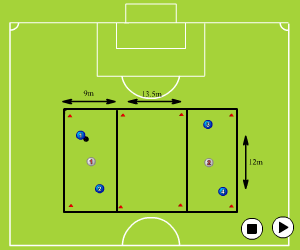
If you go onto to the chalkboard, found by clicking `create` and then `chalkboard`, select the pitch you want.
At the top of your screen you will see a black square box, the 5th icon in, click this. You will then be able to resize this box to the size you require. You can change the thickness of the line using the numbers at the bottom left, it will automatically say 2, but you can make the line thinner if you wish. You can then duplicate this box by clicking the icon furthest right, looking like two sheets of paper with the corner turned over.
Simply repeat these steps until you have the design you would like.
Hope this helps.

in more ways than one
 sportplan_football



Deliberate heading is now out of U11 grassroots matches. Here is how to coach chest, thigh and foot control so your players still win the ball in the air.

Long-range goals doubled at the 2026 World Cup as teams sat deep. Here is how to coach when to shoot from distance, the technique, and the follow-up.

Under FutureFit, your Under-9s stay at 5v5, your Under-11s stay at 7v7 and your Under-13s stay at 9v9. Same pitch, same numbers, one more year. Here is how to make sure that year feels like a step forward rather than a repeat.
Use our expert plans or build your own using our library of over 700+ drills, and easy-to-use tools.
JOIN NOW